10 best MCP servers for UI design and frontend work (2027)
By Ingot UI11 min read
The best MCP server for UI design depends on which gap your agent has: Figma’s MCP server tells it what a design looks like, a component server (Ingot UI, shadcn, Untitled UI, 21st) gives it real parts to build with, and a browser server (Playwright, Chrome DevTools) lets it check the result. Most teams get the biggest jump from one of each, connected in Claude Code or Cursor in a few minutes.
Summarize withChatGPTClaudePerplexity
On this page
An AI coding agent with no design context builds the average of everything it has seen: a grey card, a blue line chart, a table with no states. MCP servers fix that by giving the agent tools it can call for designs, components, docs and a real browser. This list covers the ten we think are most useful for frontend and UI work in Claude Code, Cursor, Codex and VS Code.
Ingot UI publishes this post and our own MCP server is on the list, so read our entry with that in mind. We are not the only design system with an MCP server (Untitled UI, shadcn, shadcn/studio and Chakra UI have them too), and for many projects another entry here is the better first install. Every server below was checked against its official page in November 2026; links go to those pages.
What a good MCP server for UI design gives your agent
- 1Real sources, not guesses. Design files, component code or docs the agent can read, so it stops inventing tokens and APIs.
- 2Output you can keep. Code that lands in your repo in your stack, or layers that land in your Figma file, not a demo in someone else’s sandbox.
- 3Memory across sessions. Rules, tokens or a design system the agent can come back to, so screen ten matches screen one.
- 4A way to check the result. Screenshots, accessibility snapshots or an audit, so the agent can see what it built before it says it is done.
- 5Easy, safe setup. One command or a short JSON entry, an official source and clear limits on what the server can touch.
The 10 best MCP servers for UI design
1. Ingot UI MCP
Best for: founders and developers building SaaS dashboards who want the agent to use one finished design system in code and in Figma. It is built for dashboards and admin screens, so it is not the right pick for marketing sites. The Ingot UI MCP server gives your agent 2,636 React + Tailwind v4 components checked against Figma, the tokens for 9 design systems, charts, icons and an audit.
init_projectwrites the tokens, the globals.css lines and rules files (CLAUDE.md, AGENTS.md, .cursor/rules/ingot.mdc) so later sessions stay on the system.search_components,get_component_codeandadd_componentsfind components and return every file they need plus the install command;scaffold_screenturns a screen description into a page built from library parts.get_figma_designbuilds a component or a whole dashboard template as editable layers in your Figma file, through the Figma MCP server.audit_uichecks your UI code for hard-coded colours and off-system patterns before the agent finishes.- Free account with 50 calls a day and the free Loopo system; Pro removes the limit and unlocks every system.
2. Figma MCP server
Best for: teams whose designs live in Figma and want the agent to read frames, variables and components instead of a screenshot. The official Figma MCP server runs remotely at https://mcp.figma.com/mcp (a desktop version exists for some organization and enterprise setups). If you searched for “Figma MCP”, this is the one Figma maintains.
get_design_contextreturns design context and code for a selected layer;get_screenshot,get_metadataandget_variable_defsadd an image, a layer outline and the variables in use.use_figmacreates and edits content in Figma files (remote server only; writing outside your drafts needs a Full seat).search_design_systemand the Code Connect tools map Figma components to the components in your codebase.- A
create_design_system_rulesprompt generates a rules file so generated code follows your conventions.
3. shadcn MCP
Best for: Tailwind projects already on shadcn/ui that want the agent to browse and install from any registry in components.json. The shadcn MCP server runs locally with npx shadcn@latest mcp, and pnpm dlx shadcn@latest mcp init --client claude sets it up for Claude Code.
- Search, browse and install components with plain requests such as “add a login form from the shadcn registry”.
- Works with any shadcn-compatible registry, including third-party ones you add to
components.json(Ingot UI’s free components install this way too). - Gives the agent primitives, not a finished look: you still decide what your dashboard cards and charts look like.
4. Untitled UI MCP
Best for: teams using Untitled UI React who want the agent to pick from a large, neutral component and page-template library. The Untitled UI MCP server is remote at https://www.untitledui.com/react/api/mcp.
- Seven tools, including
search_components,get_component_bundle,get_page_templatesandsearch_icons. - It does not write files itself: it returns an Untitled UI CLI command that the agent runs, so the project must be set up with
npx untitledui initfirst. - Free components work without signing in; PRO components, semantic search and page templates need a PRO licence (OAuth or an API key).
5. 21st MCP (formerly Magic MCP)
Best for: quickly finding or generating standalone React + Tailwind pieces such as hero sections, pricing tables and animated buttons. The 21st MCP is a hosted server; install it with npx @21st-dev/cli@latest init --client claude (or cursor, vscode, codex).
searchandget_componentpull from the 21st.dev community catalogue;generateanditerate_generationcreate new components when AI access is enabled on your account.- Needs an API key from 21st.dev; older Magic keys were reset, so old guides may not work.
- Components come from many authors, so expect to unify spacing and colour yourself when you mix them on one screen.
6. Playwright MCP
Best for: letting the agent open what it built, click through flows and confirm a screen actually works. Playwright MCP, from Microsoft, drives a real browser and reads structured accessibility snapshots instead of relying on screenshots.
- Navigate, click, type and fill forms, so the agent can test a modal, a filter or a drawer end to end.
- Accessibility snapshots double as a quick check that buttons and inputs have names.
- Runs locally with
npx @playwright/mcp@latest; no account needed.
7. Chrome DevTools MCP
Best for: debugging and performance work on real pages: layout bugs, console errors, slow loads. Chrome DevTools MCP gives the agent DevTools in a live Chrome.
- Takes screenshots, reads console messages with source-mapped stack traces and inspects network requests.
- Records performance traces and pulls out insights, useful when a dashboard chart makes the page janky.
- Runs locally with
npx -y chrome-devtools-mcp@latest; there is also a Claude Code plugin.
8. Storybook MCP
Best for: teams with their own component library in Storybook who want agents to reuse those components rather than write new ones. The Storybook MCP addon is installed with npx storybook add @storybook/addon-mcp and serves at http://localhost:6006/mcp while Storybook runs.
- A docs toolset lists components and shows their docs and stories; a development toolset writes and previews stories; a testing toolset runs story tests and accessibility checks.
- The docs toolset reads a components manifest, which you enable in
.storybook/main.ts; component API details are best supported in React projects. - Storybook marks its AI features as preview, so expect changes.
9. Context7
Best for: keeping the agent on current framework APIs (Tailwind v4, Next.js, React 19, Base UI) instead of what was true in its training data. Context7 serves up-to-date, version-specific docs and code examples.
- Two tools:
resolve-library-idfinds the library andquery-docsfetches the relevant docs. - Remote at
https://mcp.context7.com/mcpwith an API key;npx ctx7 setup --claudeor--cursorconfigures it for you. - It does not know your design system. Pair it with a component server for UI work.
10. Framer MCP
Best for: marketing sites built in Framer, where the agent should edit the real site instead of writing code you then rebuild. The official Framer MCP server is remote at https://mcp.framer.com/mcp and signs in with OAuth.
- The agent can work on the canvas, components, supported project settings and CMS in projects your account can access.
- Changes stay in your project or a branch until you publish, so you can review them first.
- Webflow has an official MCP server too, if your site lives there.
Comparison table
| Server | What it gives the agent | Runs | Account |
|---|---|---|---|
| Ingot UI | Dashboard design systems: components, tokens, charts, Figma layers, UI audit | Remote | Free key (50 calls a day); Pro unlimited |
| Figma | Design context, screenshots, variables; writes to the canvas | Remote (desktop option) | Figma account; seat rules for some tools |
| shadcn | Browse and install from shadcn registries | Local (npx) | None |
| Untitled UI | Component and page-template search, install commands | Remote | Free components without login; PRO licence for the rest |
| 21st | Community components, AI generation | Remote | API key |
| Playwright | Browser control via accessibility snapshots | Local (npx) | None |
| Chrome DevTools | Screenshots, console, network, performance traces | Local (npx) | None |
| Storybook | Your own components, stories and tests | Local (dev server) | None |
| Context7 | Current library docs and examples | Remote | API key |
| Framer | Edit and publish Framer sites | Remote | Framer account (OAuth) |
Which servers to combine
- Figma design, your own code: Figma MCP + Storybook MCP (or shadcn) + Playwright. The agent reads the frame, maps it to your components and checks the result.
- No designer, SaaS dashboard: Ingot UI + Playwright + Context7. The agent builds from a finished system, checks it in a browser and stays on current APIs. See how to get good UI out of Claude Code.
- Design in Figma from code: Ingot UI
get_figma_design+ Figma MCP. The agent places real dashboard templates in your file as editable layers. - Marketing site: Framer or Webflow MCP, plus 21st for one-off sections if you code it instead.
More servers is not always better. Each one adds tool descriptions to the agent’s context, and two component servers on the same screen often means two visual styles. Start with one source of components and add others only when you hit a gap.
How to connect an MCP server in Claude Code
In Claude Code, add a remote server with claude mcp add --transport http, and a local one by giving the command to run. --scope user makes it available in every project on your machine. Run /mcp inside Claude Code to check that each server is connected.
# Ingot UI: components, tokens, Figma layers, UI audit (key from ingotui.com/account)
claude mcp add --scope user --transport http ingot-ui https://mcp.ingotui.com/mcp --header "Authorization: Bearer YOUR_API_KEY"

# Figma: read frames and variables, write to the canvas (sign in when asked)
claude mcp add --scope user --transport http figma https://mcp.figma.com/mcp

# Playwright: let the agent open and click through what it built
claude mcp add playwright npx @playwright/mcp@latest
How to connect an MCP server in Cursor, VS Code and Codex
Cursor reads ~/.cursor/mcp.json (all projects) or .cursor/mcp.json (one project). Remote servers take a url and optional headers; local servers take a command and args. This is the exact Ingot UI entry from the MCP page:
{
  "mcpServers": {
    "ingot-ui": {
      "url": "https://mcp.ingotui.com/mcp",
      "headers": {
        "Authorization": "Bearer YOUR_API_KEY"
      }
    }
  }
}
A fuller Cursor setup with a design source, a component source and a browser looks like this. Restart Cursor and check each server under Settings, Tools and MCP.
{
  "mcpServers": {
    "ingot-ui": {
      "url": "https://mcp.ingotui.com/mcp",
      "headers": { "Authorization": "Bearer YOUR_API_KEY" }
    },
    "figma": {
      "url": "https://mcp.figma.com/mcp"
    },
    "shadcn": {
      "command": "npx",
      "args": ["shadcn@latest", "mcp"]
    },
    "chrome-devtools": {
      "command": "npx",
      "args": ["-y", "chrome-devtools-mcp@latest"]
    }
  }
}{
"servers": {
"ingot-ui": {
"type": "http",
"url": "https://mcp.ingotui.com/mcp",
"headers": {
"Authorization": "Bearer YOUR_API_KEY"
}
}
}
}[mcp_servers.ingot-ui]
url = "https://mcp.ingotui.com/mcp"
http_headers = { Authorization = "Bearer YOUR_API_KEY" }Prompts that work
You never call MCP tools by name; you ask in plain words and the agent picks the tool. Name the system, the file, the data and the states, and ask the agent to check its own work at the end.
Set this project up with the Ingot UI Loopo system (init_project) and write the rules files it returns.Using the Ingot UI Vantage system, build app/(app)/billing/page.tsx: a plan card with usage meters for contacts, sends and seats, a payment method card, and a billing history table. Data comes from lib/data/billing.ts. Include empty and loading states. Run audit_ui at the end and fix what it reports.Read the selected frame with the Figma MCP server (get_design_context and get_variable_defs). Map each part to an existing component before writing new ones, use our tokens instead of hex values, then open the page with Playwright and compare it with the frame’s screenshot.Find a Vantage page template with search_components, then call get_figma_design and run each returned program with use_figma in my Figma file.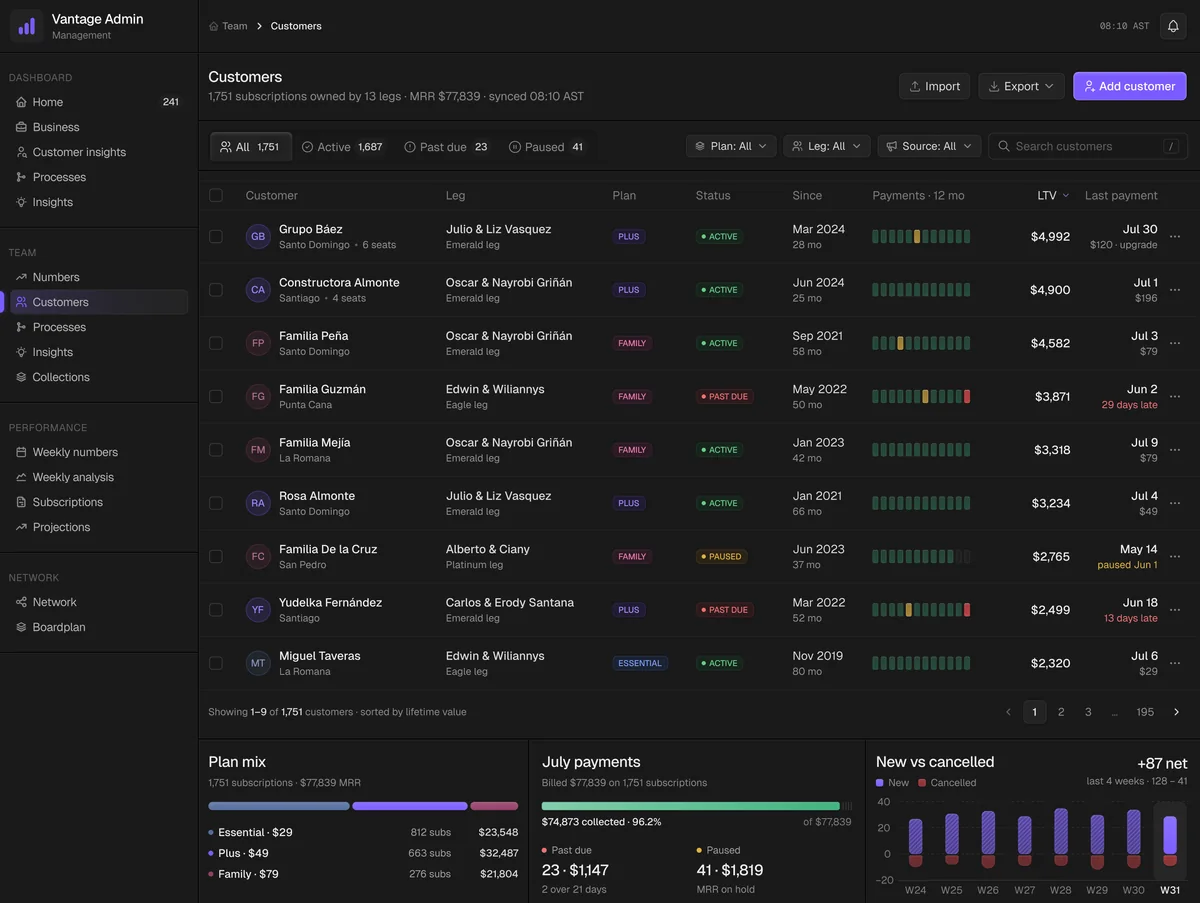
For the longer version of why this works, read MCP for UI components and why AI-generated dashboards look generic. For the cards these prompts produce, see card UI design examples.
Common mistakes
- Installing servers from unofficial copies. Several popular servers have community forks with similar names; use the vendor’s own page or repository.
- Pasting API keys into project files that get committed. Keep keys in user-level config or environment variables.
- Connecting two component libraries and letting the agent mix them on one screen.
- Skipping the check step. Without a browser or an audit, the agent cannot see that a modal overflows or a colour is off-system.
- Expecting a docs server like Context7 to make UI look better. It fixes APIs, not design.
Frequently asked questions
What is the best MCP server for UI design?
It depends on the gap: Figma’s MCP server for reading designs, a component server such as Ingot UI, shadcn or Untitled UI for building, and Playwright or Chrome DevTools for checking. For SaaS dashboards without a designer, Ingot UI plus Playwright is a strong start.
Is there an official Figma MCP server?
Yes. Figma runs a remote MCP server at https://mcp.figma.com/mcp that works with Claude Code, Cursor and other MCP clients. It reads design context, screenshots and variables, and its use_figma tool can write to the canvas.
Can Claude design UI in Figma?
Yes, through MCP. With the Figma MCP server connected, Claude Code can create and edit layers with use_figma, and Ingot UI’s get_figma_design builds full dashboard templates in your file as editable layers.
Do MCP servers work in Cursor and Codex as well as Claude Code?
Yes. MCP is an open standard. Cursor uses an mcp.json file, VS Code uses .vscode/mcp.json and Codex uses ~/.codex/config.toml; the same server URL works in each.
Are MCP servers safe to connect?
Treat them like any dependency. Install only from the vendor’s official page, prefer read-only keys, keep keys out of your repo and revoke ones you no longer use. Local servers run code on your machine, so check where they come from.
About Ingot UI
Ingot UI is a library of nine dashboard design systems built from real product screens. Every generated React component is checked against its Figma original before it ships. How we write guides.